01 · Eligibility badge
“Eligible for LootID”
Publisher-controlled flag on each asset. Only items you approve show the mark. Nothing else appears anywhere in the UI.
LootID plugs into the publisher's own inventory UI. Eligible items get a verified badge; a single action turns the digital object into a registered physical collectible — without leaving the client.
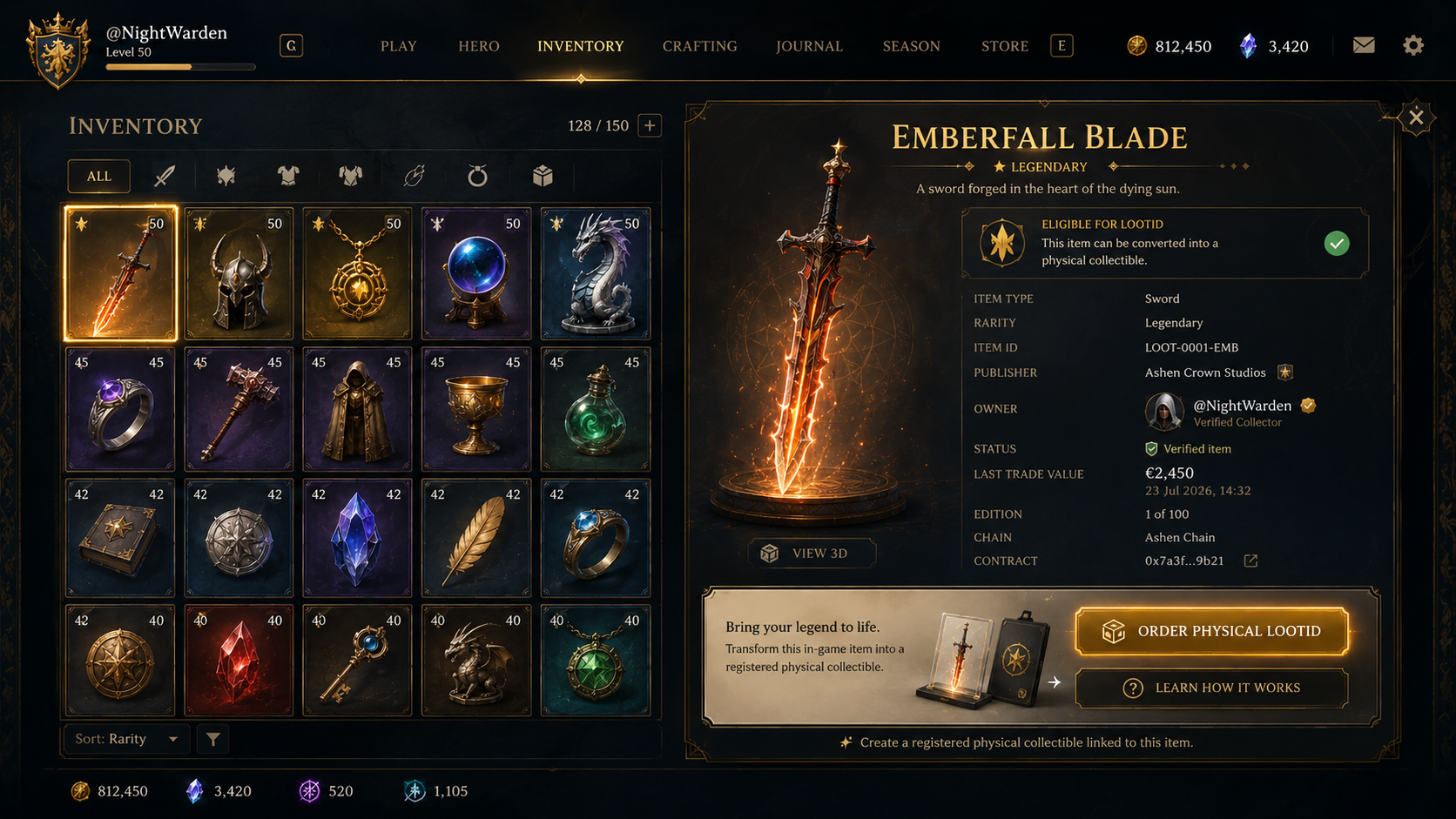
Publisher-controlled flag on each asset. Only items you approve show the mark. Nothing else appears anywhere in the UI.
Confirms the asset is a real, registry-linked instance — not a duplicate or exploit. Includes publisher, edition and item ID.
The action opens LootID's checkout flow inside a publisher-branded panel. Manufacturing, QC, encasement and shipping are handled by us.
A quiet secondary CTA that explains identity, provenance and transfer — for the collector who wants to understand before they commit.
Player owns the eligible asset in-game.
One-tap request from the inventory panel.
LootID manufactures, encases, chip-verifies.
Object enters the public LootID registry.
Ship to the collector. Transferable, inheritable.
The badge, the CTA and the entire flow are gated by a single eligibility signal you own. Turn it on per asset, per edition, per region — or turn it off entirely at any time.
Native to your client · Invisible until eligible